


USB 2.0 Video Adapter(model: DM-II) FAQ For Vista XP Users
Where can I find the driver for installation in Windows Vista ?
The Vista driver of this USB 2.0 video adapter can be downloaded from the following link:
http://site.allaboutadapters.com/downloads/DMII-Vista-Driver.rar
After download finished, please upzip the drive file and use it accordingly.
Driver not installed correctly in Windows XP. What to do ?
0). Download the new driver update from http://site.allaboutadapters.com/downloads/WDM_drv0411_B.zip and save the downloaded driver update to your desired location, for example, C:\Documents and Settings\usr\My Documents\My Webs…
1) Right-click “My Computer” and left-click “Properties”.

2) Select “Hardware” and “Device Manager” and click “OK” as follows:

3) Locate the question-marked USB Device.

4) Right-click “USB
Device” and left-click “Properties”.

5) Select “General” and “Reinstall Driver” and click “OK”.

6) Select “ Install from a list or specific location (Advanced)” and click “Next”.
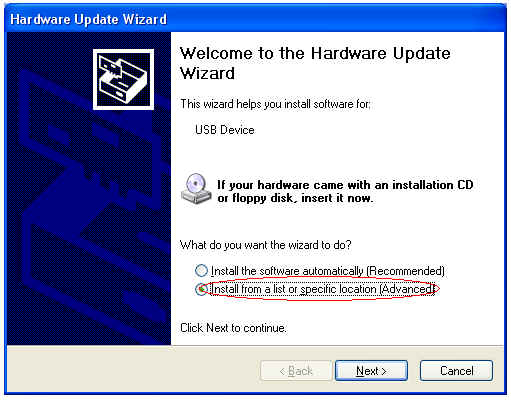
7) Select “Browse” and specify the location of your downloaded driver update file(WDM_drv0411_B.zip).
Then click “OK” to exit and click “Next”.

8) Select “Continue Anyway”.

9) Click “Finish” to complete the Reinstallation.

